
Download Tracks – Photo Sharing, Group Albums, Social Experiences
Overview
Tracks is a desktop application designed to help users create and manage shared photo albums with friends, family, and colleagues. The software enables individuals to track experiences—such as travel trips, weekend getaways, celebrations, or creative interests—by collecting and organizing photos from multiple contributors into a single, cohesive album. Its core purpose is to simplify the process of preserving shared memories in a collaborative, interactive space.
Target users include social groups, travel enthusiasts, event planners, and anyone looking to maintain digital keepsakes of meaningful moments. The app is particularly useful for people who want to maintain a visual record of group experiences without relying on fragmented social media posts or disjointed email threads. It supports real-world use cases such as documenting weddings, school reunions, or casual outings, while also allowing users to create thematic Tracks around hobbies like art, fashion, or food.
Tracks integrates with user activity and relationships to automatically surface relevant Tracks, suggesting new group albums based on shared interests and interactions. The developer did not provide additional details about the company or development background. However, the app’s design philosophy emphasizes simplicity, creativity, and seamless collaboration.
Key Features & Capabilities
- Group Photo Albums – Users can create shared albums where multiple contributors can upload, like, and comment on photos in real time.
- Track Creation – Easily start a new Track for any event, journey, or interest, and invite others to join.
- Auto-Magical Track Discovery – The app uses user activity and relationship data to suggest relevant Tracks, helping users rediscover and continue ongoing experiences.
- Multi-Platform Access – Available on Windows, Mac, and Linux, allowing consistent access across devices.
- Thematic Tracking – Beyond events, users can track interests such as food, fashion, or art with friends, creating digital keepsakes around shared passions.
These features streamline the process of preserving memories by centralizing content in one interactive space. For example, a group planning a weekend getaway can start a Track, add photos during the trip, and receive instant updates from others. Similarly, a creative team can use Tracks to document a fashion shoot or art exhibition, fostering collaboration and shared ownership of the visual narrative.
User Interface, Workflow & Performance
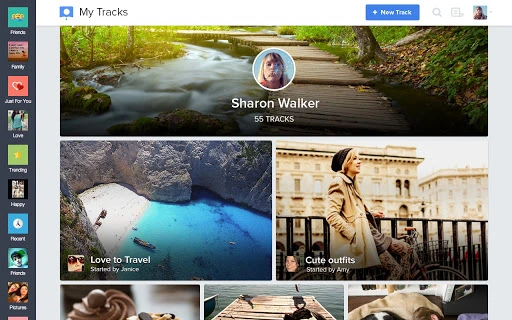
The user interface is designed with simplicity and visual appeal in mind, emphasizing intuitive navigation and a clean layout. Users can access their Tracks from a central dashboard, where each album is displayed as a visually engaging card with recent activity. Navigation is streamlined through a sidebar menu, with quick access to active Tracks, recent uploads, and suggested albums.
Workflow efficiency is enhanced by the app’s ability to auto-suggest Tracks based on user behavior and connections. The process of adding photos, inviting members, and commenting is designed to be quick and frictionless. However, exact performance details were not specified by the developer.
General observations suggest stable operation under typical usage conditions. The developer did not specify resource usage details such as CPU or RAM consumption. Performance behavior is expected to align with standard desktop applications, but actual behavior may vary based on system configuration and network conditions.
Compatibility & System Requirements
Tracks is compatible with Windows, Mac, and Linux operating systems. The software version is 1.0.0, with an installation size of 50MB. This indicates a lightweight footprint suitable for most modern desktop environments.
Exact system requirements were not listed. The developer did not provide information on minimum hardware specifications, such as processor speed, RAM, or disk space beyond the installation size. Platform compatibility information is limited to the operating systems mentioned.
Users should ensure their system meets general requirements for running desktop applications, including a stable internet connection for syncing and sharing features. No additional dependencies were noted.
Pros and Cons
Pros
- Intuitive, visually appealing interface designed for ease of use
- Supports collaborative photo sharing across multiple platforms
- Auto-suggests Tracks based on user activity and relationships
- Lightweight installation at 50MB
- Free to download and use
Cons
- No detailed system requirements provided
- Resource usage (CPU/RAM) not disclosed
- Limited information about update frequency or long-term maintenance
- No official support channels listed beyond email contact
FAQ Section
Is Tracks available for Windows, Mac, and Linux?
Yes, Tracks is compatible with Windows, Mac, and Linux operating systems.
Is the software free to use?
Yes, Tracks is available at no cost to users.
Can I use Tracks offline?
While the app supports online features such as real-time collaboration and auto-suggested Tracks, offline functionality is not specified. Users are advised to maintain an internet connection for full functionality.
How often are updates released?
Information about update frequency was not provided. The software version is 1.0.0, and users should check for updates through the application or official website.
Is my data secure when using Tracks?
Security measures were not detailed by the developer. Users should exercise caution when sharing personal photos and ensure they trust the individuals invited to their Tracks.
Final Thoughts + CTA
Tracks offers a refreshing approach to photo sharing by combining social interaction with visual storytelling. Its ability to create shared albums around events, trips, or shared interests makes it a compelling choice for users who value collaborative memory-keeping. The clean interface, multi-platform support, and intelligent Track suggestions enhance the overall user experience.
While some technical details remain unspecified, the app delivers on its promise of simplicity and creativity. It is especially beneficial for groups that want to preserve experiences in a unified, interactive space. For those seeking a free, easy-to-use tool for managing group photo albums, Tracks stands out as a strong contender.
Download Tracks now and start building beautiful, shared memories with friends and family.







